Library / Blogs
SitePoint Engineering Blog
Learn Web Design & Development with SitePoint tutorials, courses and books - HTML5, CSS3, JavaScript, PHP, mobile app development, Responsive Web Design
By SitePoint engineers · SitePoint · Added 2026-10-12
All content belongs to SitePoint engineers / SitePoint. We only link to it and give credit. Report a problem
Learn this article
About 37 min left. Your work is saved as you go.
What you are about to study
SitePoint wrote this to explain how they thought about a problem. You should know the basics: caching, queues and replication.
Ideas you will meet
- Distributed Systems
- Consensus, time, failure and the fundamentals of scale-out.
What we already know about this
Our own lessons on these ideas. Read them here before you start, so it makes sense.
Real-World Systems · 9 minWhy SSDs are fast, and block, file and object storageHow flash storage differs from spinning disks, and which kind of storage fits which job.Read here
Hard disks versus SSDs
A hard disk drive (HDD) stores data on spinning magnetic platters. To read data the head must move (seek) to the right track and wait for the platter to rotate: about 10 milliseconds per random access. Reading sequentially is much faster, because the head stays put.
A solid-state drive (SSD) stores data in NAND flash chips. There is nothing to move, so a random read takes about 0.1 milliseconds, roughly 100 times faster.
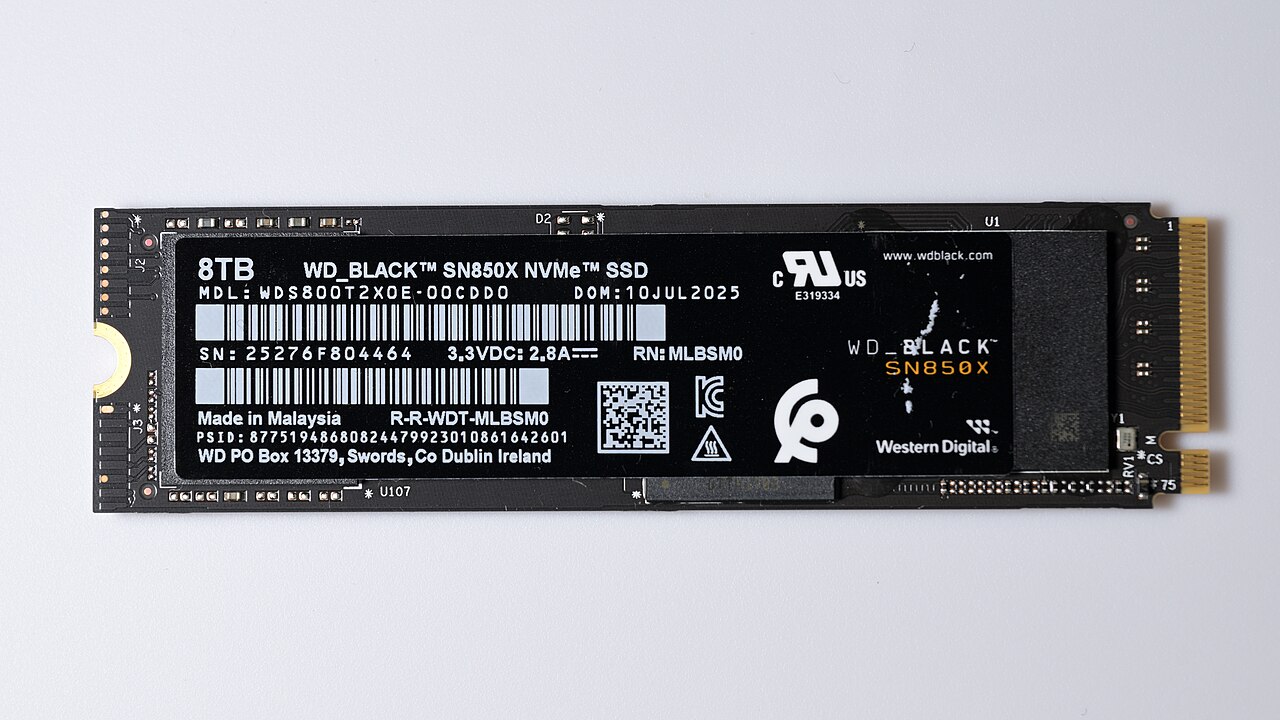 Image: 4300streetcar · CC BY 4.0 · Source · Wikimedia Commons: Western Digital SN850X NVME solid state drive 8TB front side
Why flash is fast
- No mechanical delay: reads are electrical.
- Parallelism: a controller spreads data across many flash chips and channels and reads from several at once.
- Fast interface: NVMe drives talk over PCIe with many queues, instead of the older SATA interface built for spinning disks.
How flash works (and its quirks)
- Flash is organised in pages (the smallest unit you read or write, a few KB) grouped into blocks.
- You can write a page only if it is empty, and you can only erase a whole block at once.
- So an update is written to a new place and the old page is marked stale. The controller's flash translation layer (FTL) keeps a map from logical to physical addresses.
- Later, garbage collection moves live pages and erases blocks to reclaim space. This extra internal writing is write amplification.
- Cells wear out after a limited number of erase cycles, so the controller spreads writes evenly (wear levelling). Drives are rated for endurance.
- The TRIM command tells the drive which blocks the operating system no longer uses, so it can clean up in advance.
Design consequence: SSDs love many small random reads, but heavy random writes and very full drives cost performance and lifetime. Log-structured storage engines, which write sequentially, suit them well.
100%Figure SDA-RWS-10-1 · Inside an SSD · © forcsguy.com
Three kinds of storage service
Block File Object What you get A raw volume of fixed-size blocks A shared folder tree A flat bucket of objects found by key Access Attached to one server, which formats it Mounted by many servers (NFS, SMB) HTTP API (GET, PUT, DELETE) Latency Lowest Low Higher Scale Per volume Moderate Practically unlimited Edit in place Yes Yes No: replace the whole object Cost Highest Medium Lowest Use for Databases, boot disks Shared content, home directories Images, video, backups, logs, data lakes 100%Figure SDA-RWS-10-2 · Choosing a storage type · © forcsguy.com
100%Figure SDA-RWS-10-3 · What each storage type looks like · © forcsguy.com
100%Figure SDA-RWS-10-4 · How an object store is built · © forcsguy.com
How each type is reached
Block storage is a raw volume owned by one server, attached directly or over a storage network (Fibre Channel, iSCSI); the server formats it or hands it to a database. File storage sits on top of block storage and is shared over file protocols such as NFS and SMB. Object storage is a flat namespace of objects reached through an HTTP API, trading speed for scale, cost and durability.
Practical guidance
- Put databases on block storage (SSD-backed for performance).
- Put user uploads, media and backups in object storage, serve them through a CDN, and keep only the object's key in your database.
- Use file storage only when software truly needs a shared file system.
- Object stores give durability through replication or erasure coding (see the Core Concepts course), and offer storage classes: hot, infrequent access and archive, with lower cost and slower access.
- Always back up. Replication protects against hardware failure, not against deleting the wrong thing.
Real-world reading
Related reading
- Cockroach Labs BlogCockroach Labs engineers · Cockroach LabsBlogs
- AWS Database BlogAWS database teams · Amazon Web ServicesBlogs
- Minimizing Read-Write MySQL Downtime at YelpYelp engineers · YelpCase Studies
- Fivetran BlogFivetran engineers · FivetranBlogs
Show 6 moreShow fewer
- PlanetScale BlogPlanetScale engineers · PlanetScaleBlogs
- ClickHouse BlogClickHouse engineers · ClickHouseBlogs
- Elastic BlogElastic engineers · ElasticBlogs
- Google Research BlogGoogle researchers · GoogleBlogs
- RisingStack Engineering BlogRisingStack engineers · RisingStackBlogs
- SitePoint Engineering BlogSitePoint engineers · SitePointBlogs
Go deeper on this
A path through videos, articles, other case studies and code on the same ideas as SitePoint Engineering Blog.
Warm upGet the vocabulary first.
Books · Free from the author
Concurrent and Distributed Systems (Cambridge lecture notes)
Eight lectures on time, broadcast, replication, consensus and transactions, with notes, slides and video. Free from the author under CC BY-SA.
University of CambridgeIntermediate
Books · Free from the author
Computer Networks: A Systems Approach
How networks are built and why: protocols, routing, congestion control and the internet's architecture. The authors publish it free online under CC BY 4.0.
Systems ApproachIntermediate
WatchHow others solve the same problem, on video.
Videos belong to their creators and play from YouTube. More on YouTube (opens in a new tab)
ReadEngineers explain it in their own words.
Blogs · Free from the author · Read here
Scalable Web Architecture and Distributed Systems
A full chapter on the building blocks of large websites: availability, performance, reliability, scalability, caches, proxies, indexes, load balancers and queues. Free to read here under CC BY 3.0.
The Architecture of Open Source ApplicationsBeginner40 min
Papers · Read here
Facebook’s photo storage
This paper describes Haystack, an object storage system optimized for Facebook’s Photos application. Facebook currently stores over 260 billion images, which translates to over 20 petabytes of data.
USENIXIntermediate
See it in another companyThe same ideas, a different system.
Case Studies · Read here
Aroma: Using ML for Code Recommendation at Facebook
Thousands of engineers write the code to create our apps, which serve billions of people worldwide. This is no trivial task—our services have grown so diverse and complex that the codebase contains…
FacebookIntermediate
Case Studies · Read here
Brooklin: Distributed Service for Near Real-Time Data Streaming at LinkedIn
Brooklin—a distributed service for streaming data in near real-time and at scale—has been running in production at LinkedIn since 2016, powering thousands of data streams and over 2 trillion messages per day. Today, w...
LinkedInIntermediate
Read the codeSee how it looks when it is real.
GitHub
Engineering Blogs
A huge directory of company engineering blogs to learn from real production systems.
kilimchoiIntermediate
GitHub
Awesome Scalability
Curated reading list of articles on the architecture of scalable, reliable systems.
binhnguyennusIntermediate
Keep learning
Loading community…